Unless you add a measurement instrument to your computer, you have only the sound card as an analog I/O port. You can use the sound card to digitize ac analog voltages but only within a limited range. You can, however, add some signal processing and measure a wider variety of signals, even those that produce dc or lowfrequency outputs. For example, you can directly connect a thermistor to make a sound-card thermometer to monitor or record the temperature on PCBs (printed-circuit boards), circuits, heat sinks, and more.
Thermistors are popular temperature sensors because they allow easy detection of changes in resistance. Once you measure a thermistor’s resistance, you can apply the following equation to find the temperature:
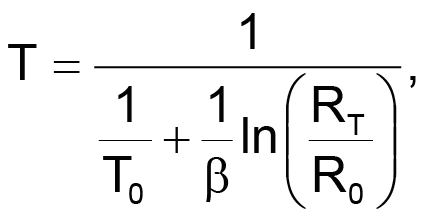
where RT is the thermistor resistance and T0 is the temperature in Kelvins at which the thermistor’s resistance is R0. You can find the value of β in a thermistor’s data sheet.
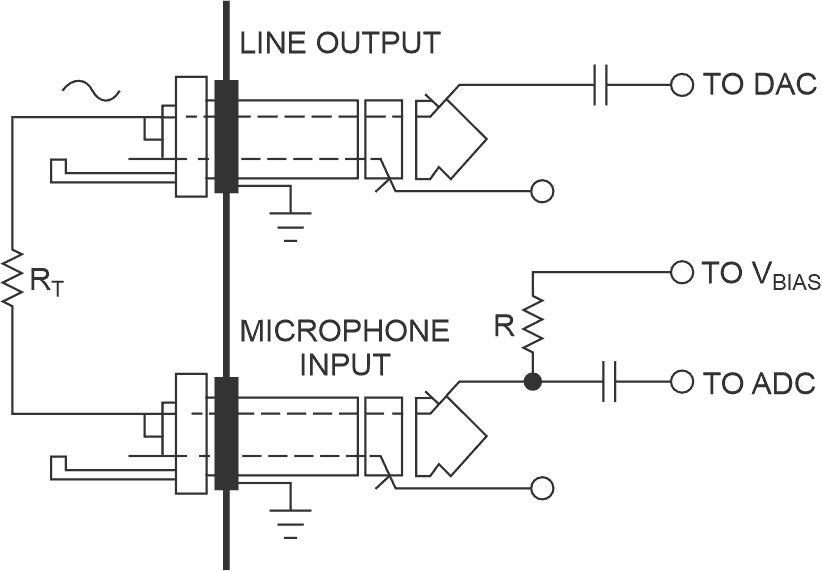
Figure 1 shows the easiest way to interface a thermistor to a sound card. The microphone input has an internal bias resistor, R, with a typical value of 2 to 5 kΩ. A dc bias voltage drives this resistor. The bias resistor connects the thermistor between the line or the headphone output and the microphone input, which forms a voltage divider with the internal bias resistor. Those components are all the circuit needs. Note that some microphone inputs may have different internal connections, so check yours before use.
 |
|
| Figure 1. | The internal microphone bias resistor and the externally connected thermistor form a voltage divider. |
You also need a sinusoidal signal because the sound card’s inputs are ac coupled. The sound card’s audio output can produce an ac voltage at the microphone input, whose amplitude is proportional to
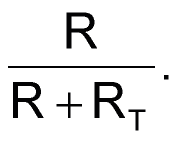
You can do a simple calibration to find the output signal’s amplitude and the value of R by replacing RT with known values, such as 0 and 10 kΩ.
A sound card’s measurement accuracy is worse than what you could achieve using a commercial data-acquisition card, but this ratiometric arrangement and calibration keep errors to approximately 1% for resistor values of 1 to 100 kΩ. Even without get temperature errors of 1 to 2K with a 10-kΩ thermistor at room temperature. Accuracy degrades to 3 to 5K over the thermistor’s operating temperature.
The Java executable or the Java source code can be downloaded from the Downloads section.
You should consider adding protection to the sound card’s audio I/O ports by inserting series resistors. Typically, a few kilohms is all the circuit needs. You can also use an inexpensive USB (Universal Serial Bus) sound card to spare and protect your PC sound card’s inputs.
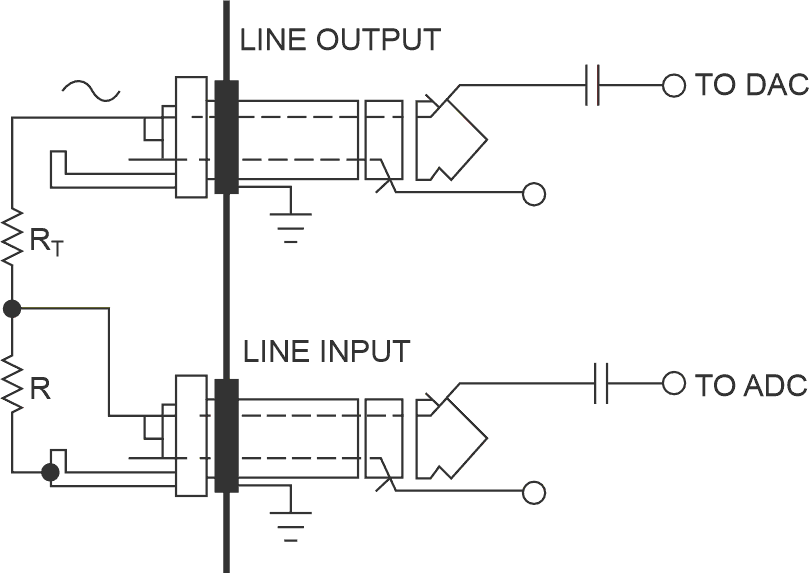
You can add second and third thermistors to your system by adding an external resistor divider (Figure 2). This approach lets you use both audio channels and a third thermistor at the microphone input. In addition to using thermistors, you can use the sound card with other resistive sensors, such as photoresistors or potentiometric displacement sensors. You can even connect capacitive sensors if you add some more components and signal processing (Reference 1).
 |
|
| Figure 2. | You can add second and third thermistors to your system by adding an external resistor divider. |
Reference
- Klaper, Martin, and Heinz Mathis, "2-Pound RLC Meter impedance measurement using a sound card," Elektor, June 2008, pg 64.